How to Stop Thermostat Clicking: Quick Fixes & When to Call a Pro
If your thermostat is clicking, it often indicates issues with the relay, transformer, batteries, wiring, or software. To address this, first power cycle the unit, replace the batteries, and tighten any loose terminal screws. Also, check its mounting, switch modes, and use a multimeter to verify control voltage. While short clicks can be normal, loud or irregular clicking may signal deeper problems like worn relays or loose wiring, which require professional attention. If these basic fixes don’t resolve the issue or if you notice exposed live wiring, it’s best to contact a licensed HVAC technician for a thorough diagnosis and repair.
Why Your Thermostat Is Clicking and When It Matters
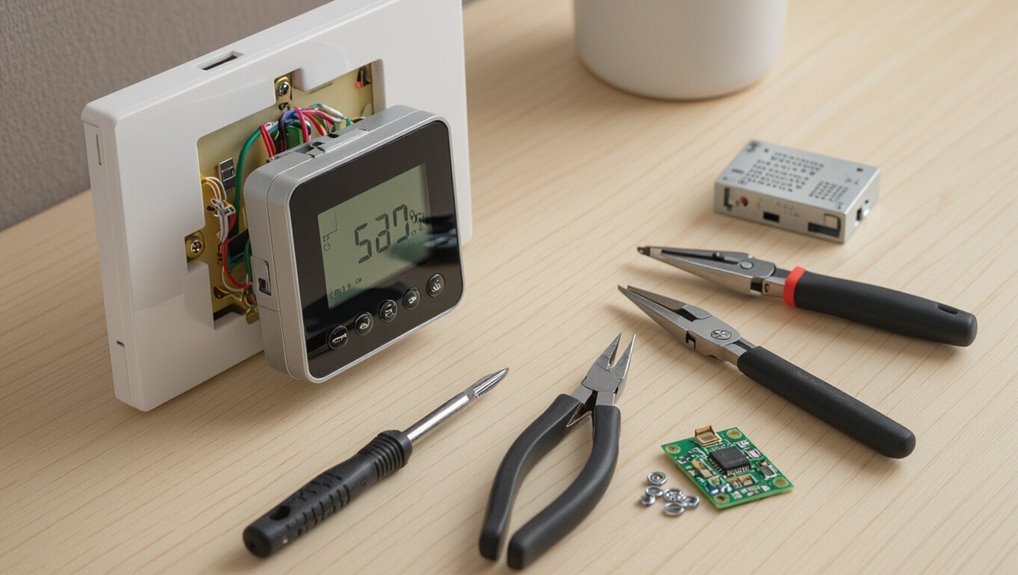
A clicking thermostat can stem from simple causes like relay or switch activation, loose wiring, or mechanical wear, and distinguishing these helps prioritize fixes.
Some clicks are routine and harmless during mode changes, while others are irregular, loud, or accompanied by performance issues and may signal trouble.
Persistent, unusually timed, or safety-related clicks should prompt inspection because they can indicate wiring faults, relay failure, or hazards such as short circuits or gas valve problems.
Common causes of thermostat clicking
When a thermostat emits a repetitive clicking sound, it typically signals a mechanical or electrical action rather than a mysterious failure; understanding the common causes helps determine whether the noise is harmless or indicates a problem.
Common causes include failing relays, loose wiring, a dying battery, stuck switches, or short cycling equipment.
Simple diagnostics and instructions on how to stop thermostat clicking often resolve these issues.
Normal vs. abnormal clicking sounds
Although occasional clicks can be part of normal operation—such as the relay engaging when the system cycles—distinct patterns and frequencies signal issues that warrant attention.
Short, single clicks at regular intervals often indicate normal thermostat or HVAC cycling.
Rapid, repeated, irregular, or unusually loud clicks suggest mechanical wear, loose components, or electrical faults and merit further inspection or professional diagnosis.
When clicking indicates a safety or system problem
Periodic clicking can be harmless, but certain patterns point to safety or system faults that require prompt attention.
Rapid, repeated clicks may indicate relay failure; a single click followed by system shutdown signals flame sensor or ignition issues.
Clicking paired with odor, smoke, or pilot problems demands immediate professional inspection.
Ignoring these signs risks equipment damage, carbon monoxide hazards, or fire—call a qualified technician.
Quick Troubleshooting Steps You Can Try Right Now
A few simple checks can often stop a thermostat from clicking without calling a technician. These include safely power-cycling the unit, replacing low batteries, tightening loose wires and terminals, and ensuring the thermostat and its cover are mounted without contact noise.
If those steps fail, restoring default settings and schedules can rule out software or configuration causes.
Power-cycle the thermostat safely
Power-cycle the thermostat safely by cutting its power for a short interval to clear minor electronic glitches that can cause clicking.
Turn off the HVAC breaker or remove power at the dedicated switch, wait 30–60 seconds, then restore power.
Observe whether clicking stops during startup.
If clicking persists or safety features trip, discontinue and consult a qualified technician to avoid electrical or system damage.
Check and replace thermostat batteries
One quick check that often solves intermittent clicking is to inspect and, if needed, replace the thermostat batteries.
The technician or homeowner should remove the cover, note battery orientation, and install fresh alkaline cells.
After replacement, verify the display and mode operation.
Weak batteries can cause false signals or cycling; replacing them is inexpensive and frequently restores stable thermostat behavior without further intervention.
Tighten loose wiring and terminal connections
Inspect the thermostat’s wiring and terminal screws for looseness or corrosion, since poor connections are a common cause of intermittent clicking.
Power it off, gently tug each wire to confirm secure attachment, and tighten screws snugly without overtorquing.
Clean corroded contacts with a contact cleaner or fine sandpaper.
Restore power and test.
If clicking persists, a technician should inspect the control board or wiring.
Inspect the thermostat mounting and cover for contact noise
Several common clicking sounds originate not from the electronics but from the thermostat’s mounting or cover rubbing against the wallplate.
Inspect the unit for loose screws, uneven mounting, or warped trim.
Tighten mounting screws gently, add rubber washers or felt pads between cover and plate, and reseat the cover.
Recheck for noise; if persistent, replace brittle mounting clips or consult a technician.
Reset thermostat settings and schedules
Power-cycle the thermostat and clear any custom programs to rule out software or schedule conflicts causing intermittent clicks.
After restarting, restore factory defaults if clicks persist, then reconfigure basic settings only.
Check for firmware updates and verify schedule entries are sensible. Document original settings before resets so restoration is possible.
If resets don’t stop clicking, consider professional diagnostics for hardware or relay issues.
Detailed Diagnostic Checklist for Clicking Issues
A concise checklist helps isolate the source of persistent clicking by confirming whether the HVAC responds when the thermostat actuates.
It should include testing the relay or contactor at the outdoor unit or furnace, using a multimeter to measure control voltage and continuity, and observing thermostat behavior in heat, cool, and fan modes.
The technician or homeowner should also log clicking frequency, timing, and system state to identify reproducible patterns.
Verify HVAC system response when thermostat clicks
Begin by observing whether the HVAC equipment actually responds when the thermostat clicks: note whether the furnace or air handler starts, the outdoor unit engages, or any relays hum or click in sync with the thermostat.
Record which components react, timing, and frequency. If clicks occur without corresponding system activity, document steady power, thermostat mode, and recent changes before proceeding to targeted electrical checks.
Test the relay/contactor operation at the outdoor unit or furnace
Inspect the contactor or relay next, since its coil and contacts are common causes of intermittent clicking and failed outdoor or blower operation.
Observe coil movement when the thermostat signals; listen for weak or chattering clicks.
Check for pitted, burned, or welded contacts and excessive play.
If mechanical failure, corrosion, or arcing is evident, replace the component or schedule professional service to prevent recurring faults.
Use a multimeter to check control voltage and continuity
Use a multimeter to verify that control voltages are present and that circuits show proper continuity before replacing components.
Measure 24VAC between R and W/Y/G as applicable, checking for stable voltage during clicks.
Test continuity across thermostat terminals with power off and across relays/transformer coils.
Record intermittent opens or voltage drops; these indicate wiring, transformer, or relay faults needing repair or replacement.
Observe thermostat behavior during different modes (heat/cool/fan)
Having verified voltages and continuity, the technician should systematically observe thermostat behavior across heat, cool, and fan-only settings to correlate clicking with specific control calls.
Note which mode triggers clicks, whether clicks occur on call initiation, during operation, or on cycle end.
Inspect display, switch positions, and any mode-specific wiring.
Record whether clicks coincide with compressor, fan relay, or reversing valve activity.
Log clicking frequency, timing, and system state for patterns
When systematic logging is applied, technicians can turn intermittent clicking into actionable data by recording each event’s frequency, exact time stamp, and the system state (mode, thermostat setpoint, outdoor conditions, and equipment status) to reveal repeating patterns or correlations.
Logs should note ambient temperature, recent user adjustments, cycle phase, and any concurrent sounds or indicator lights; analyze for timing, sensor drift, wiring faults, or relay failures.
Fixes by Cause: How to Stop Specific Types of Clicking
The following section addresses targeted remedies for common causes of thermostat clicking, organized by symptom and source.
It covers fixes for power-related clicks (weak batteries or interruptions), electrical component failures (relays, transformers, contactors), intermittent wiring or loose terminals, software or firmware glitches in smart units, and vibration-induced mechanical or HVAC component noise.
Each cause is paired with concise troubleshooting steps and recommended repairs or replacements.
Clicking caused by weak batteries or power interruptions
A common source of intermittent thermostat clicking is low battery power or brief interruptions in the control circuit; weak batteries cause the display and relays to reset, while power glitches trigger the system’s fail-safes and produce audible clicks.
Replace batteries with fresh high-quality cells, guarantee secure battery contacts, check for loose wiring at the thermostat and breaker, and restore consistent power to eliminate recurrence.
Clicking from a faulty relay, transformer, or contactor
Several distinct components—relays, transformers, and contactors—can produce rhythmic or single-click sounds when their internal contacts wear, coils fail, or voltage delivery becomes inconsistent.
Diagnosis requires isolating the HVAC or furnace control board, listening near the component, and testing coil resistance and output voltage.
Replace failed relays or contactors and swap transformers showing inconsistent voltage.
When unsure, hire a licensed technician to avoid electrical hazards.
Clicking due to intermittent wiring or loose terminals
When intermittent wiring or loose terminals cause clicking, electrical connections rapidly make and break contact, producing a repetitive or sporadic snap that often correlates with system cycles or vibrations.
Technicians should power down, inspect terminal blocks and wire insulation, tighten or reterminate loose conductors, and replace corroded connectors.
If clicks persist or wiring is inaccessible, consult a licensed electrician or HVAC pro to prevent shorts and fire risk.
Clicking caused by software/firmware glitches in smart thermostats
Loose or damaged wiring can be an obvious mechanical cause of clicking, but modern smart thermostats can produce similar sounds from software or firmware glitches.
Firmware bugs, faulty updates, or corrupted settings may trigger rapid relay commands or status chimes.
Troubleshooting steps include rebooting the device, checking for and applying firmware updates, resetting to factory defaults, and contacting the manufacturer if problems persist.
Clicking from mechanical mounting or HVAC component vibrations
Many instances of thermostat clicking stem not from electronics but from mechanical mounting or nearby HVAC component vibrations transmitting noise into the wall or device.
Inspection should focus on loose mounting screws, warped wall plates, or vibrating ductwork and blower motors.
Tightening fasteners, adding rubber washers or foam pads, and isolating ducts often eliminates noise.
If vibration persists, consult an HVAC technician to diagnose and secure sources.
When to Call a Professional HVAC Technician
If clicking persists after basic checks or if the issue involves exposed wiring, persistent arcing, or burning smells, a professional HVAC technician should be called to avoid safety risks.
Technicians will inspect controls, relays, transformers, and wiring, perform safe electrical diagnostics, and replace faulty components as needed.
Expect routine repairs to take one to three hours with typical costs ranging from modest service fees up to several hundred dollars for parts and labor depending on the fault.
Signs you should stop DIY troubleshooting
When troubleshooting a persistent thermostat clicking sound, recognize clear boundaries where amateur fixes may cause more harm than help.
Stop DIY efforts if the clicking returns after basic resets, if symptoms escalate or become intermittent, if components inside the thermostat appear damaged, or if system-wide issues (uneven heating/cooling, frequent cycling) emerge.
At that point, contact a qualified HVAC technician for diagnosis and repair.
Safety risks and electrical hazards to avoid
Any exposure to live wiring or damaged electrical components creates a real risk of shock, burns, or fire; consequently, HVAC electrical issues should be handled by trained technicians.
Attempting repairs without knowledge of breakers, wire gauges, grounding, or capacitor discharge risks injury and equipment damage.
Corroded terminals, frayed insulation, and overheating signs warrant immediate professional evaluation to prevent electrocution and fire hazards.
What a technician will inspect and repair
A qualified HVAC technician will methodically inspect the thermostat, control wiring, air handler, and outdoor unit to diagnose clicking causes and perform targeted repairs.
They will test relay and transformer function, verify correct voltage and grounding, replace faulty relays or capacitors, tighten or reterminate loose connections, clean or replace contaminated switches, and calibrate or replace the thermostat if needed, documenting findings and safety checks.
Typical costs and time estimates for common repairs
Several common thermostat and control-system repairs fall into predictable time-and-cost ranges, helping homeowners decide whether to call a professional.
Thermostat replacement: 30–60 minutes, $75–$250.
Rewiring or terminal repair: 1–2 hours, $100–$300.
Relay or control board replacement: 1–3 hours, $150–$600.
Sensor replacement: 30–90 minutes, $50–$200.
Diagnostic fees often $50–$150, sometimes waived with service.
Preventive Maintenance to Avoid Future Clicking
A concise preventive maintenance routine can minimize future thermostat clicking by addressing a simple checklist of thermostat and HVAC tasks.
Proper installation and placement, regular battery replacement, and seasonal system checks are highlighted as best practices to prevent misfires and false signals.
Following these steps helps maintain reliable operation and reduce the need for repairs.
Routine thermostat and HVAC maintenance checklist
When preventive checks are performed regularly, thermostats and HVAC systems are less likely to develop the mechanical or electrical faults that cause clicking.
A concise routine reduces failures and extends component life:
- Inspect and clean thermostat contacts and housing
- Replace batteries annually
- Check wiring for corrosion or looseness
- Clean or replace air filters
- Schedule HVAC system tune-ups twice yearly
Best practices for thermostat installation and placement
Good placement and proper installation practices further reduce the chances of thermostat clicking by preventing false readings, short cycling, and undue mechanical strain.
Install thermostats on interior walls away from drafts, direct sunlight, vents, appliances, and exterior doors.
Mount at eye level, secure wiring and mounting plates firmly, avoid shared walls with noisy equipment, and follow manufacturer clearance and compatibility guidelines for accurate sensing and reliable operation.
Battery replacement and seasonal system checks
Replace batteries regularly and schedule seasonal system checks to prevent thermostat clicking caused by weak power or undetected faults.
Technicians inspect wiring, relays, batteries, and sensor operation during tune-ups, identifying corrosion, loose connections, or firmware issues.
Homeowners should note irregular clicks after battery changes or seasonal shifts and keep records of maintenance dates.
Proactive upkeep reduces failures and unexpected service calls.
Choosing or Upgrading a Thermostat to Reduce Clicking
When selecting or upgrading a thermostat to reduce clicking, the differences between mechanical, digital, and smart models and their typical click tendencies should be considered.
Attention to features such as solid-state relays, programmable settings, and vibration-dampening mounts can help guarantee quieter, more reliable operation.
The decision to install a unit professionally or as a DIY project should weigh electrical complexity, compatibility with existing HVAC wiring, and warranty requirements.
Types of thermostats and their susceptibility to clicking
Which thermostat type is least likely to click frequently depends on its sensing and switching mechanisms. Mechanical bimetal units click more often; mercury or electronic sensors reduce cycles. Smart, solid‑state models typically minimize audible switching. Consider system compatibility and installation quality when choosing to lower clicking frequency.
| Type | Switching | Clicking Risk |
|---|---|---|
| Bimetal | Mechanical | High |
| Mercury | Liquid tilt | Moderate |
| Solid‑state | Electronic | Low |
Features to look for in quiet, reliable thermostats
Having established how different sensing and switching methods affect clicking frequency, attention turns to specific features that make a thermostat both quiet and reliable.
Look for solid-state or digital switching, low-voltage compatibility, well-sealed mechanical relays if present, adjustable deadband or cycle delay, accurate sensors with calibration options, quality build and sound-damping housing, and reputable warranties and reviews confirming long-term silent performance.
Professional vs. DIY installation considerations
Although quieter thermostats can often be installed by a competent homeowner, deciding between professional and DIY installation hinges on electrical familiarity, system complexity, and warranty terms.
Professionals guarantee correct wiring for multi-stage or heat-pump systems, preserve manufacturer warranties, and diagnose hidden issues causing clicks.
DIY suits simple single-stage units if instructions are followed and power is off; otherwise, hire a licensed technician.
Troubleshooting Examples and Short Case Scenarios
Several brief cases illustrate common causes and fixes for thermostat clicking.
One example describes intermittent clicks traced to a failing transformer that was replaced.
Another shows constant clicking cured by re-seating loose wiring.
A third reports repeating clicks stopped after a smart thermostat firmware update.
These scenarios set up practical troubleshooting steps readers can follow.
Case: Intermittent clicking solved by replacing transformer
A homeowner reported intermittent clicking from the thermostat and intermittent system operation; inspection revealed the HVAC transformer producing inconsistent voltage due to aged windings.
A technician measured fluctuating low voltage, confirmed insulation breakdown, and replaced the transformer.
After installation, steady 24V was restored, clicking ceased, and system cycles normalized.
The case highlights transformer failure as a cause requiring component replacement rather than wiring adjustments.
Case: Constant clicking fixed by re-seating loose wires
The prior example of a failing transformer contrasts with a simpler, wiring-related fault: a thermostat that clicked continuously despite steady 24V and otherwise normal system behavior.
Inspection revealed a loose R terminal wire intermittently losing contact. Re-seating and tightening the conductor eliminated arcing and restored stable relay behavior.
The homeowner was advised to secure connections and monitor; no further clicks recurred.
Case: Smart thermostat firmware update resolved repeating clicks
Investigators traced a series of rapid, repeating clicks to a smart thermostat that repeatedly rebooted during scheduled firmware updates.
Technicians observed update loops causing relay cycling and audible clicks.
After installing the manufacturer’s patched firmware and disabling auto-reboot during peak hours, the device stabilized.
Homeowner monitoring confirmed no recurrence; recommendation included keeping firmware current and contacting support if updates fail or clicks resume.
Quick Reference: Step-by-Step Action Plan for an Immediate Fix
A concise action plan guides what to check and try immediately when a thermostat clicks.
The steps below list quick safety checks and fixes that can be completed in under ten minutes, followed by clear next steps if the noise persists.
Follow them in order to minimize risk and avoid unnecessary repairs.
- Turn off power at the breaker or thermostat before touching anything
- Inspect and tighten loose wiring or terminal screws
- Replace or reseat the thermostat batteries and clean contacts
- Test the system after each quick fix for up to ten minutes
- If clicking continues, contact a qualified HVAC technician or consider replacing the thermostat
Immediate safety checks before any action
Before touching wiring or removing the thermostat cover, confirm power to the HVAC system is off and that hands and tools are dry.
Verify the breaker and furnace switch are labeled and tripped off.
Inspect for damaged wires, corrosion, or water near the thermostat; do not proceed if present.
Wear insulated gloves and keep children and pets away.
If unsure, contact a licensed technician immediately.
Fast fixes to try in under 10 minutes
Several simple checks and adjustments can often stop thermostat clicking within ten minutes.
First, power off breaker, remove cover, and gently dust contacts with a soft brush.
Tighten loose wire connections and guarantee batteries are fresh and seated.
Verify thermostat is level and mounted firmly.
Reassemble, restore power, and test.
If clicking persists, note sounds and timing for professional reference.
Next steps if quick fixes don’t stop the clicking
If the quick checks and simple adjustments fail to stop the clicking, proceed with a short, systematic action plan to diagnose and mitigate the issue without delay.
Power-cycle the thermostat and verify batteries; inspect wiring for loose connections or corrosion; test system response in heat and cool modes; document patterns and noises.
If clicking persists, schedule a technician to check the control board, relay, or HVAC components.
Conclusion
A homeowner learns that a thermostat’s clicking can signal simple issues—loose wiring, a failing relay, or a misaligned fan limit switch—or more serious failures needing an HVAC pro. Quick checks often silence the sound; persistent or electrical-smoke warnings demand expert service. Regular maintenance prevents recurrence. Like a telegraph’s tap in a smart-home age, the harmless click sometimes masks urgent trouble, so timely diagnosis balances cost, comfort, and safety for long-term system reliability.